TypeScript for React
Md. Aminul Islam•
Post Date:11 Feb 2026 - 09:55 PM
When building React applications, codebases often grow fast—components become more complex, props and state become harder to track, and small mistakes can create runtime bugs. That’s why I prefer TypeScript for React. TypeScript adds static typing, which helps me:
Catch errors during development (before runtime)
Make components easier to understand and refactor
Improve collaboration with better auto-completion and type hints
Write scalable, maintainable UI code
This blog is a practical TypeScript guide (with React-focused thinking), starting from setup to advanced types like generics and utility types.
Installation & Setup
Install TypeScript globally (optional)
Create tsconfig.json
Inside your project:
TypeScript Auto Compiler (for Node/Backend)
If you're running a TypeScript server (like
server.ts):Add a script in
package.json:Run:
Core TypeScript Types You Must Know
1) Primitive Types
number
string
boolean
null and undefined
symbol
bigint
2) Literal Types
Literal types restrict values to exact options.
In React, this is helpful for variants like
"primary" | "secondary".3) Union Types (|)
Union means a variable can be one of multiple types.
React use-case: API responses, optional inputs, polymorphic props.
4) Intersection Types (&)
Intersection combines multiple types into one.
5) Optional Properties (?)
React use-case: optional props.
6) Enum
Enums represent fixed values.
Arrays, Tuples, and Objects
Array Types
Tuple
Tuples represent fixed-length arrays with fixed types.
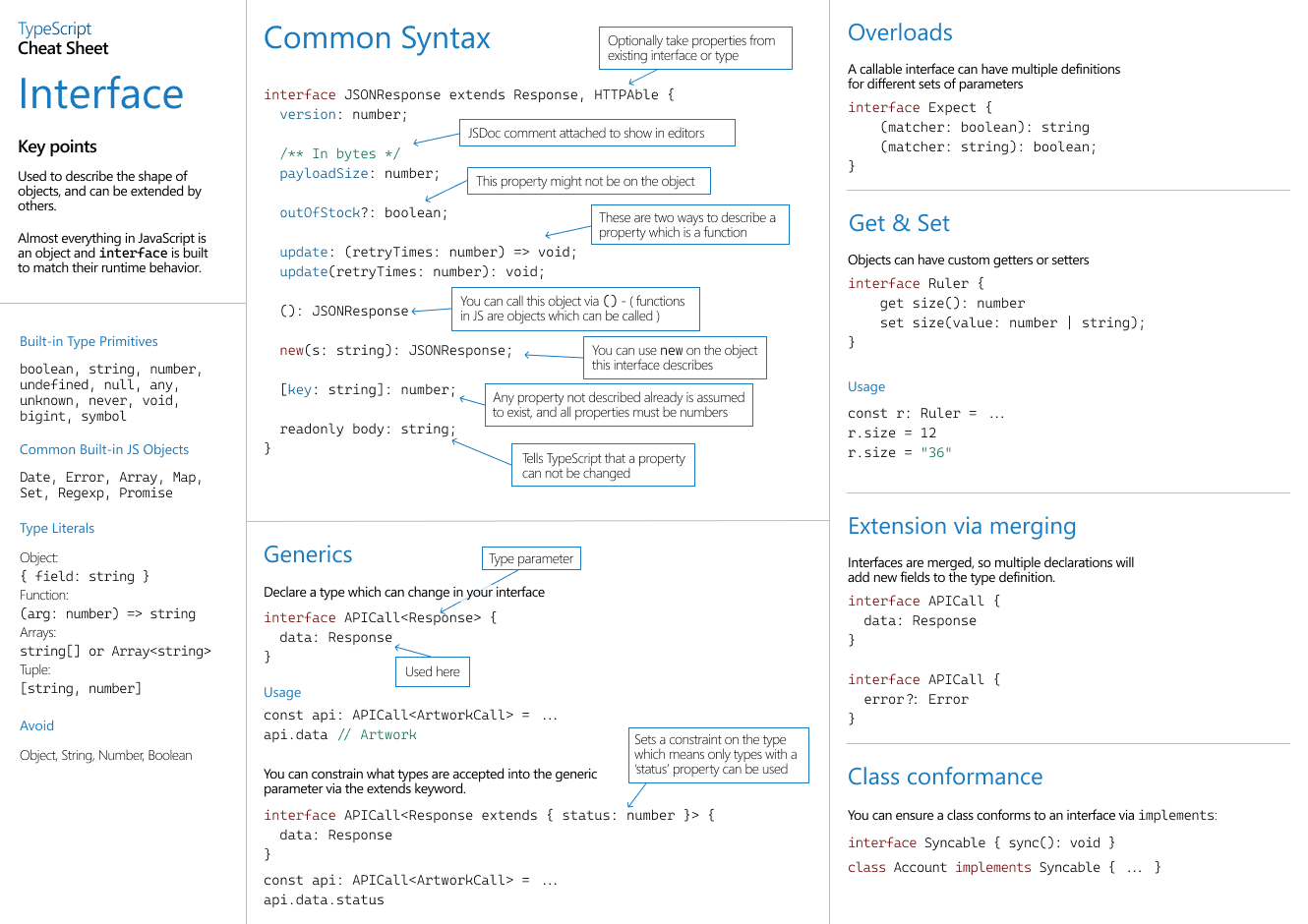
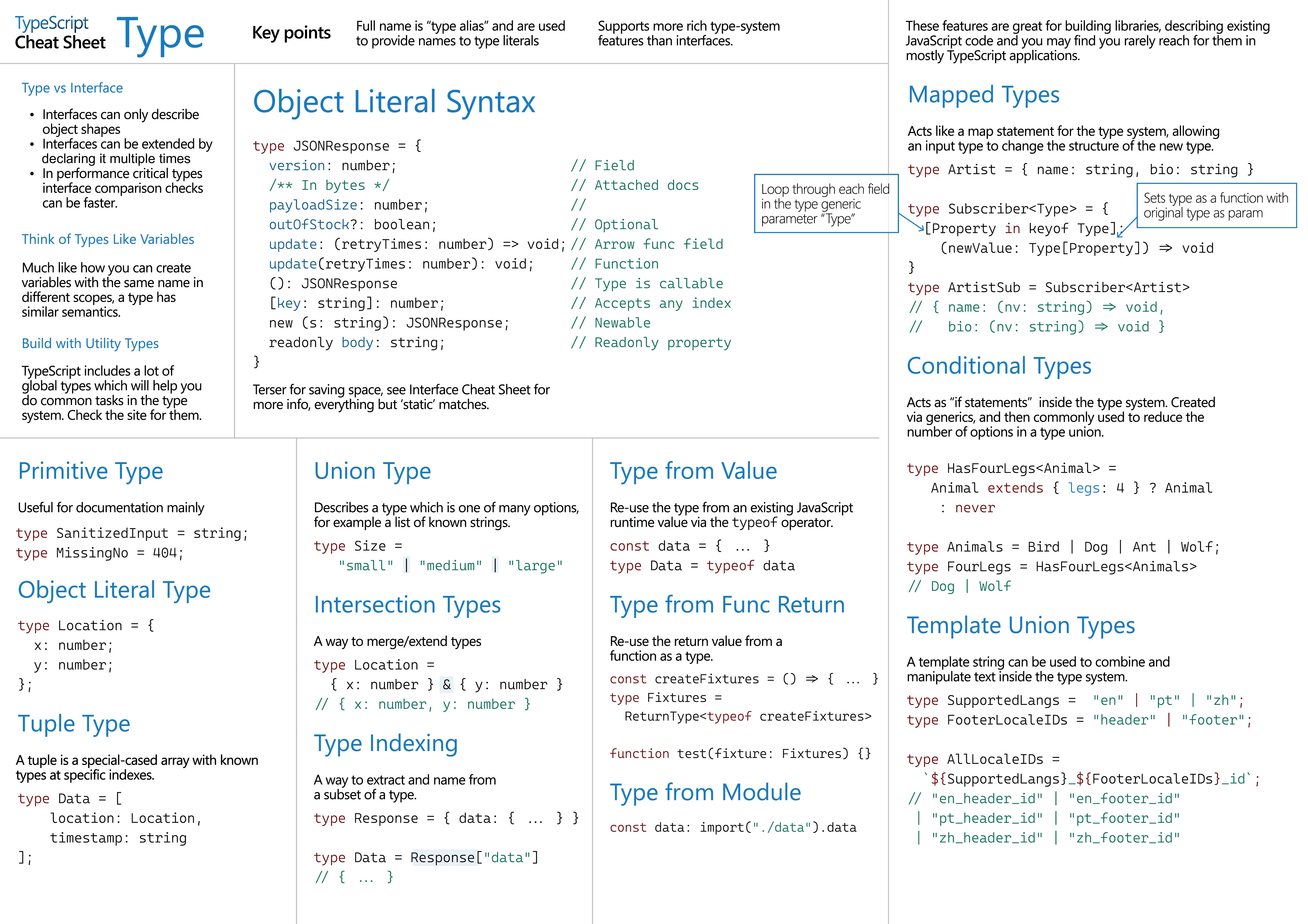
Type vs Interface (Most Common Confusion)
Type
Interface
Quick Rule I Follow
- Use interface for React props, objects, and when you might extend later.
- Use type for unions, intersections, utility combinations.
Function Typing
Normal Function
Arrow Function with Type Alias
Type Assertion (as)
When TypeScript can’t infer the type, you can assert it.
React use-case:
ref, DOM casting, API unknown types.Utility Types (Very Useful in React)
Partial<T> (makes all properties optional)
Use-case: update forms, patch requests.
Readonly<T>
Record<K, T>
Pick<T, K>
Omit<T, K>
Conditional Types
This helps in advanced generic libraries and reusable React utilities.
Nullable Types
Readonly Properties
Generics (The Most Powerful Feature)
Generics let you write reusable and type-safe code that works for multiple data shapes.
Generic Array
Generic Object
Generic Function
Generic API Response (Real Project Example)
Example: User Response
Example: Product Response
Complex Types (Nested + Array + Function)
Type Alias Example
Spread vs Rest Operator (Very Common in React)
Spread Operator (...) — Expands Values
React use-case: copying arrays/state immutably.
Rest Operator (...) — Collects Values
React use-case: flexible function params, component props spreading.
Cheat Sheet Type
Cheat Sheet for Interface